 RNDRS
RNDRSGuides
Floor Plan to Render: Turning 2D Plans into Visuals Clients Understand
June 16, 2026
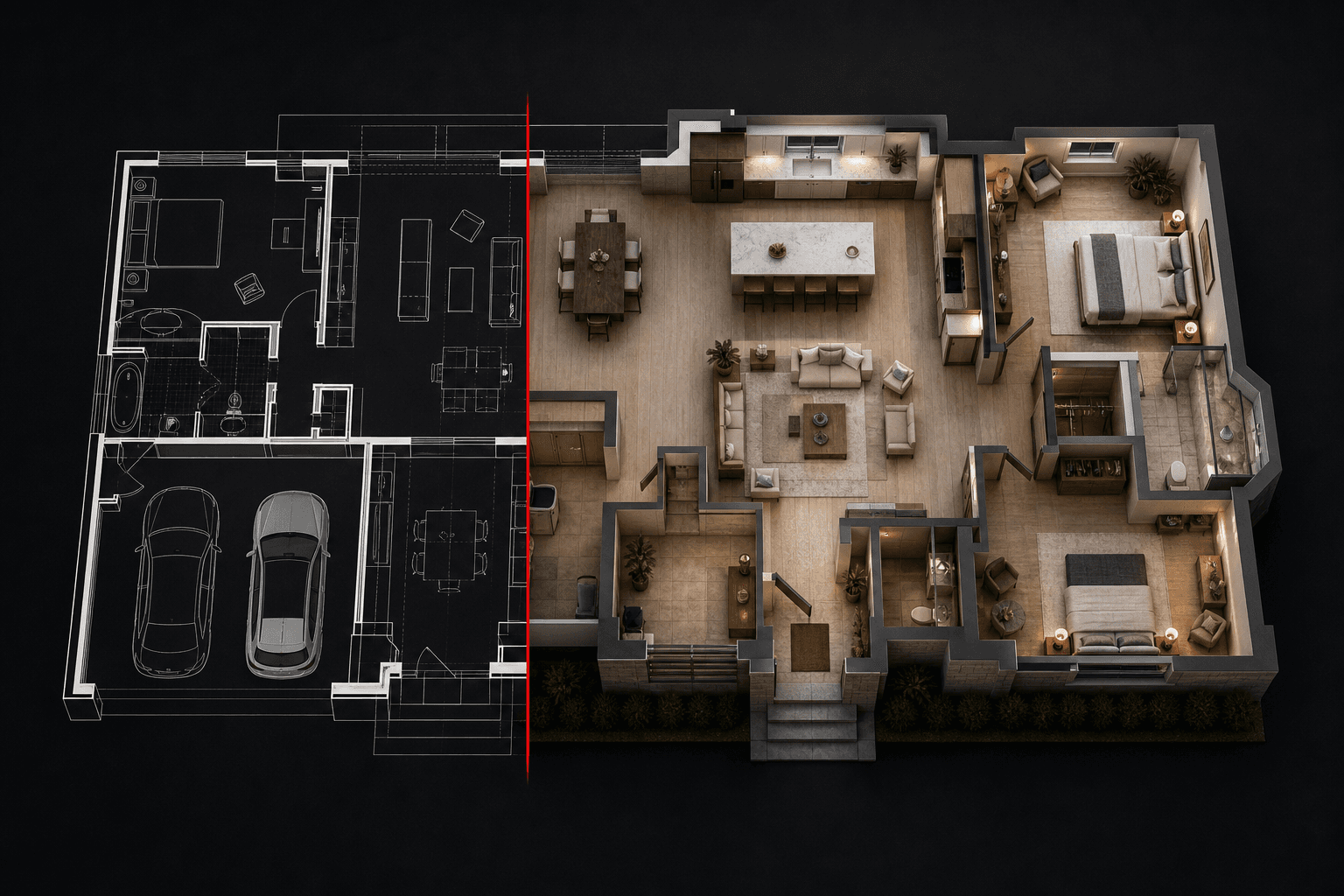
A floor plan is a contract document pretending to be a communication tool. Clients nod at the linework and then ask, three weeks later, why the kitchen is "so small" — because they never actually read the plan. Rendered plans fix the communication; here's the workflow.
What a rendered floor plan is
Take the black-and-white CAD plan and produce a top-down visual with real flooring materials, furniture, soft shadows and depth — the format every property listing and good client deck uses. Same geometry, different legibility. This is what the floor plan render tool does in seconds.
The workflow
- Export the plan as an image. PNG from AutoCAD, Revit or Archicad, dark lines on light background, 1500px+. Strip dimensions, grids and annotation layers first — visual noise confuses both the AI and the client.
- Upload and prompt. Describe flooring, palette and furnishing character: "Furnished plan, wide oak boards, white walls, warm minimal furniture, soft top-down shadows."
- Render. Walls, openings and room proportions are preserved from your linework; materials and furniture are generated onto your layout.
- Keep the set consistent. For multi-floor or multi-unit projects, reuse the same prompt across every plan on one canvas — the set reads as one document family.
- Upscale for print sets and large boards.
Who gets the most out of this
- Architects: planning sets and client decks where the plan must persuade, not just document.
- Interior designers: furniture layout options a client can compare at a glance — three layouts, three renders, one side-by-side sheet.
- Developers and agents: every unit type rendered for the listing in an afternoon. Plan-rendering services charge per plan and take days; this is seconds each.
Rendered plan vs 3D view — when to use which
A rendered plan answers layout questions: flow, adjacency, furniture fit. It does not answer spatial questions: height, light, volume. When the client's hesitation is about how a space feels, switch to eye-level: take a 3D view or sketch of the key room and render that instead. The strongest decks use both — plan for orientation, perspective for emotion.
Common mistakes
- Leaving annotation on the export. Dimension strings render as mysterious wall decorations. Clean plot, always.
- Inconsistent prompts across a set. Mixed flooring and furniture styles across floors reads as a mistake, not variety.
- Over-styling small plans. Dense furnishing on a studio plan kills legibility — "warm minimal furnishing" exists for a reason.
A rendered plan takes about as long to produce as reading this section did. Try it on a real plan free.