 RNDRS
RNDRSWorkflows
Node-Based AI Workflows for Architects, Explained
June 16, 2026
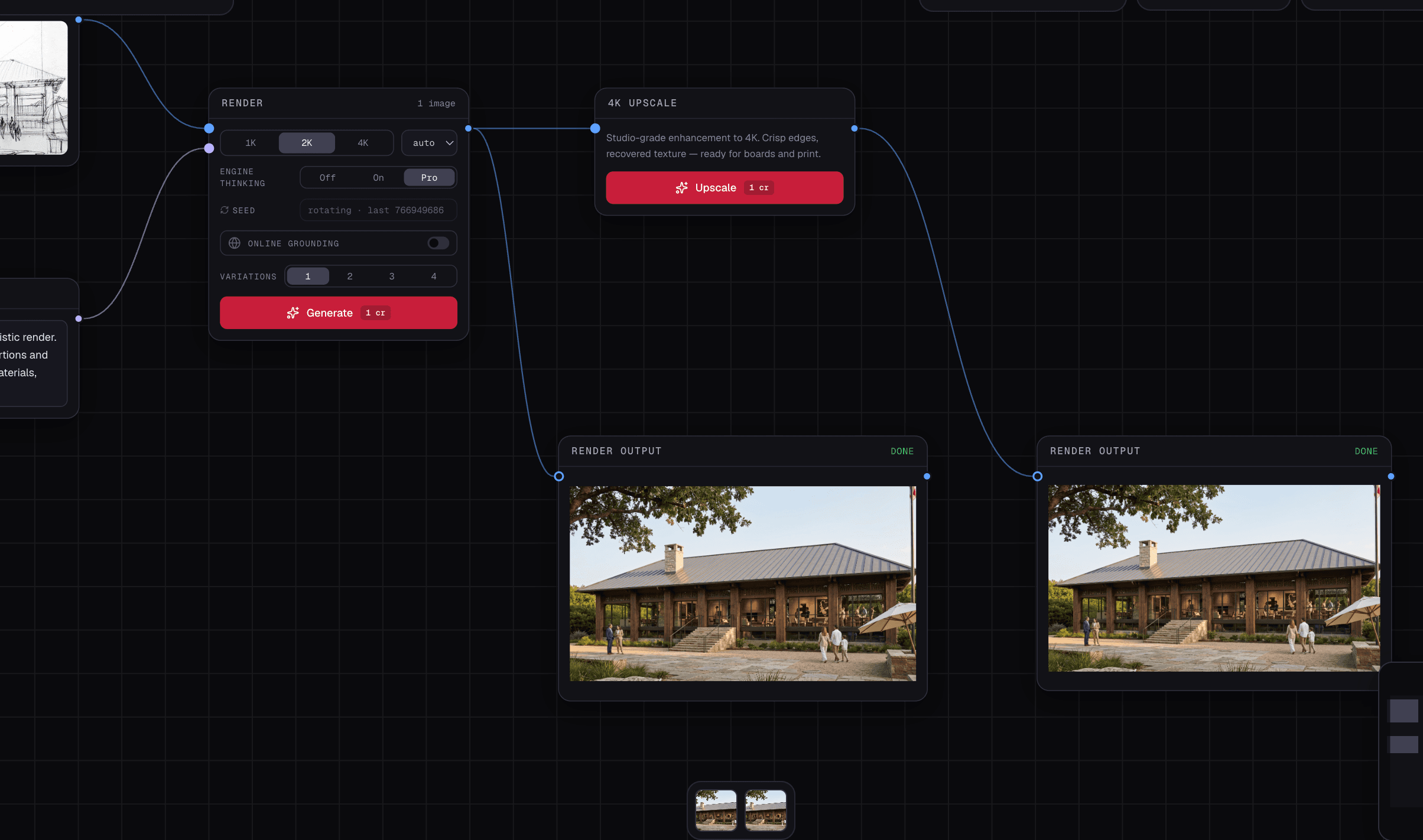
Most AI rendering tools are vending machines: insert image, receive image, repeat. That's fine for render #1. It falls apart at render #15 of a real project, when your exploration lives in a downloads folder named final_v3_ACTUAL.png. Node-based workflows exist to fix exactly this — and if you've ever touched Grasshopper, you already think this way.
What "node-based" means here
On a node canvas, every operation is a block with inputs and outputs: an upload node feeds a render node, which feeds an upscale node, which feeds a video node. The connections are the workflow, and they stay visible, editable and re-runnable.
Why this matters for design work specifically
1. Options are structure, not files
Architecture is option comparison. On a canvas, one uploaded massing export wires to four render nodes — four claddings, side by side, all visibly connected to the same source. Change the source export and the whole study can re-run. In a one-shot tool, that's four disconnected generations and a folder you'll never reconstruct.
2. Tools chain into pipelines
Real deliverables are multi-step: erase the cars from the site photo → render the proposal onto it → extend for the banner crop → upscale to 4K → animate the hero. On a canvas that's one wired chain. In tool-hopping apps, it's five downloads and five uploads, and the intermediate states are gone.
3. Workflows become assets
The chain you built for one project — "site photo → declutter → render → 4K" — is a reusable template. Studios encode their visual standards this way: same pipeline, same prompt conventions, consistent output across the whole team. The workflow itself becomes studio IP.
4. The canvas is the presentation
A populated canvas is the option study: sources, branches and results in one view. Practices increasingly screen-share the canvas in client meetings and iterate live — the client watches their comment become a render in eleven seconds.
Grasshopper minds, this is your home
If you think in dataflow — sliders into components into geometry — the mapping is one-to-one. The same instinct that parameterizes a facade parameterizes an image study: isolate the variable (material, season, camera), branch the options, compare the outputs. Render your Grasshopper option matrices with a consistent prompt and the comparison is actually scientific.
When one-shot is enough
Honestly: a single quick render of a single sketch doesn't need nodes, and RNDRS is the same three steps for that case — upload, prompt, render. The canvas isn't complexity you pay upfront; it's capability that appears the moment you iterate. Which, in architecture, is always.
Start with the free renders and build your first chain — sketch → render → 4K takes about two minutes, including the signup.